Sunday, 27 March 2016

'Linux' the open source

What is Linux?


It’s a simple operating system Software that enables application and the computer operator to access the devices on the computer to perform desired functions. The instructions are relayed by the operating system from an application. The result of any data back to the application via the operating system. In general, Linux is very similar to other operating systems, such as Windows and OS X. Linux is developed collaboratively as an operating system that meaning no one company is solely responsible for its development or ongoing support.


Where is Linux?
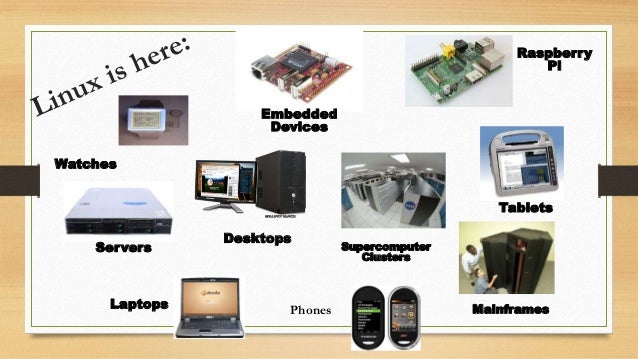
One of the most significant characteristics of Linux is where it can be used. On the other hand, Windows and OS X are generally found on personal computing devices such as desktop and laptop computers. Therefore, Symbian for small devices such as phones and PDAs, while mainframes and supercomputers found in educational, as well as corporate labs, use such s AS/400 and Cray OS.


There are just the most usable examples of Linux-based devices to consumers worldwide. The Linux Foundation recently building a centralized database that will list all currently offered Linux-base products. Example: Pioneer electronics. 


The future of Linux

In the era of the 21st century, the wonders of modern science have been giving us wonderful things day by day. Linux software is one of them that we use our everyday life. Linux is  already successful on many differents kinds of devices. Its install on BIOS of Laptop and Notebook computers, which will enable users to turn their devices in seconds. Moreover, Linux is showing up on mobile Internets devices (MIDs). There are smartphones, PDAs, netbook devices are some examples of embedded devices. Nowadays, cloud computing is a natural fit for Linux which enables cloud services such as Amazons A3 to work with superior capability to deliver online application and information to the users. Therefore, the popular Web 2.0 services on the internet, such as Twitter, LinkedIn, YouTube, and Google all relying on Linux as their operating system. 

Reference:

Proffitt, B. (2009, April Friday ). What is Linux: An Overview of the Linux Operating System. Retrieved from Linux.com: https://www.linux.com/learn/new-user-guides/376?start=5


Saturday, 19 March 2016

OS X Software in MAC

Mac OS X: It’s a power for an operating system software. Its looks beautiful and easiest design utility software. It has an amazing collection of application for the user. The OS X enables to work with iOS and MAC devices wonderfully.


Easy to Learn. Easy to use:
On a device, it’s very easy to find, share and update. With a simple gesture, we can control our device like MAC.


You can launch your favourite apps with click through the Dock. For a full library of apps, launchpad gives you quick access. The finder lets you browse and organise your file on your mac and in icloud. You can search documents, launching apps, and looking up information in spotlight search. Moreover, a Mac does so many things automatically and you don’t need to do at all.


Software and Hardware made for each other:
OS X is built to bring the best in MAC, so you can get the full system which every operation works together. The good thing that it works with the processor and graphics controller so that it delivers the best performance. The Mac keeps everything up to date on using this OS X. Mac OS X has advanced power saving display, battery life and in OS X Capitan vivid on high-resolution Retina displays.


Built for Power:
Usually, Advanced technology uses for making powerful things simple. OS X is one of them that built with on a rock-solid, time-tested UNIX foundation. It provides industry leading support for internet standards. OS X plays a vital role of taking full advantages of the multicore and fast storage in your Mac so that you can work quickly on any task. Moreover, the graphics capabilities of OS X supply makes itself more reliable to the user.

Ensure the Security:
The great advantage of the technology of OS X  to keep your Mac and the information safe. Gatekeeper makes it safer to download and install apps from the web. Sandbox helps to protect your system by isolating apps and your data. For personal information, the customizable privacy setting keeps under control. Therefore, find My Mac helps you locate your Mc on a map, set a passcode remotely, and more. In their early days, mac computers were heavily marketed to the educational world. Moreover, the PCs have made a significant role for student computing in the class. Creative industries such as graphic design and photo imaging have also been historically strong markets for Macs because of the computer ability to handle advanced graphics-related tasks. Today, the growing popularity of iPhones, iPads, and the iTunes online store. 


Reference:

Apple . (2016). OS X-whats New-Apple. Retrieved from www.apple.com:http://www.apple.com/osx/whats-new/


\

Monday, 14 March 2016

Microsoft Windows:10 Operating System

The first version of Windows, released in 1985, was simply a GUI offered as an extension of Microsoft’s existing disk operating system, or MS-DOS. Based in part on licensed concepts that Apple Inc had used for its Macintosh System Software, Windows for the first time allowed DOS users to visually navigate a virtual desktop, opening graphical “windows” displaying the contents of electronic folders and files with the click of a mouse button, rather than typing commands and directory paths at a text prompt.Microsoft windows was usually a graphical interface layered on top of the DOS operating system. Windows is the most widely used operating system in the world. There are thousands of software products available to turn on Windows. The latest windows OS 8.1, which provides a mobile computing and works like a windows phone platform. The user can use that in desktop, laptop or tablet computer using a touchscreen. Moreover, windows 10 is the latest version which has popular graphical operating systems and well designed. Users can find lots of software which are including OS that they can easy navigate through the system.
Source: http://mspoweruser.com/wp-content/uploads/msn/2015/07/win10.png
Organized Start Menu:
Windows 10 has more personal and organized start menu. if we select the stat button on the taskbar we will find the most used apps on the left and shortcut apps in our computer.
Source: http://winaero.com/blog/wp-content/uploads/2015/08/Windows-10-start-menu.png
Cortana- Ask me a question:
Recently, the windows 10 also has nice feature called Cortana which is works as a personal assistant. Its on left on your desktop and beside the start menu.  she can do everything for you that you want her to do. She can find your files and she can even tell you the nice jokes, by using microphone we can give a command to her. For example if we need to find a file we just have to speak that word like a command and right of  the way she will find that file for you.
 
Source:http://www.howtogeek.com/wpcontent/uploads/2015/07/ximg_55bc11439921b.png.pagespeed.gp+jp+jw+pj+js+rj+rp+rw+ri+cp+md.ic.SSSZci7j7O.png
Get Apps,Music and more:
There is one more option named as Store. From that store we can download games, music and some other applications also like photo editor etc.


Source: http://www.windows10update.com/wp-content/uploads/2014/10/windows_10_store_icon.jpg


References: 
The Editors of Encyclopædia Britannica. (2016, November 16). Windows OS. Retrieved from http://www.britannica.com/technology/Windows-OS
Microsoft. (2016). Whats new in windows 10. Retrieved from Get Apps,Music and more:

Operating Systems that you may not have heard of

System Software performs basic computing functions, including your computer and loading the operating system, which provides the interface between you and the machine. It also provides tools for configuring and maintaining your computer system and managing program and file. An operating system allows the user to find programs, copy and delete information, and control settings without having to know the specific coding or directions. There are many different types of operating systems, and preference usually depends on the users needs. For instance, many beginners tend to choose Windows or the Macintosh OS, while seasoned computer users may choose a less user-friendly operating system such as Linux. In the beginning, there are lots of manufacturers wanted to design their own system to compete with the another software. Windows began a partnership with IBM and Microsoft for using friendly. MS-DOS is one of the first Microsofts operating systems. This was a text-based system and it required very little hardware.

Reference: 
Gordon, J., Lankisch, K., Muir, N. Seguin, D. & Verno, A.(2013). Our Digital World: Introduction to Computing. St. Paul, MN: Paradigm Publishing, Inc.